Tuesday, June 23, 2015

Proposal for GSOC 2015: Data Wrangler extension for WSO2 Machine Learner

Data Wrangler extension for WSO2 Machine Learner

Overview

What is WSO2 machine learner?
                    Machine learning [1] is about building models from sample data. So that these models can be used to analyse big data. Machine learning is a key component of analysing big data. WSO2 is in need of integrating machine learning into their platform. This can be used in various WSO2 products.

What is Wrangler?
                    Wrangler [2] can be used to transform and clean input test data. According to this transformation, Transformation scripts can be generated either in python or JavaScript. These scripts can be used to analyse big data.

What is Jaggery?
                Web applications need various web technologies. Front-end needs HTML, CSS, JavaScript. Back-end deals with POST, JSON, XML. Server side logic is in java, PHP. With all these technologies mismatches occur. Jaggery [3] is a Completely JavaScript based way to eliminate with mismatches in web development.

The idea behind the project
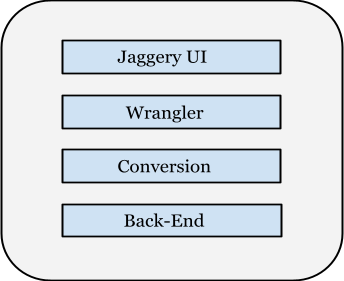
                    Project is Data Wrangler extension for WSO2 Machine Learner. Idea of the project is create the Wrangler in the machine learner. In here Jaggery UI will be used instead of Wrangler UI. Jaggery is connected to Wrangler. When an end-user connects to Jaggery and Transforms & cleans the data, Scripts are generated from Wrangler. Those scripts are converted into java and send to the back-end. These converted scripts can be used to transform big data efficiently. Wrangler, Jaggery and back-end all belong to machine learner. In this project Wrangler is also integrated into machine learner as an extension.


Design and Implementation Plan
Technologies used in this project
               Java/HTML/JavaScript
               Apache Spark
               Jaggery

Machine Learner Architecture
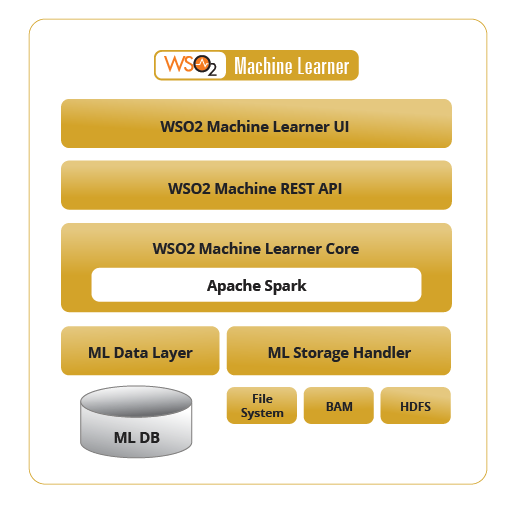
architecture-diagram.png
All the part implemented in should be added to the above architecture. Where each part is relevant in the above structure is explain below.  

  1. Implementing Jaggery UI

  • Selecting subset of operations from Wrangler and Design customized UI.
  • According to the design implementing the user interface using Jaggery.
  • This should be added to the top of the above structure.


      2.) Connect Jaggery UI to Wrangler
Wrangler has user interface and also back-end for scripts generating either in python or JavaScript. Jaggery UI should be usable as Wrangler UI for selected subset of operations. Wrangler libraries can be used to perform tasks on data cleaning and transformations for Jaggery UI. In order to this Jaggery UI should be connected to the Wrangler libraries. Next part is to get the generated JavaScript for selected operations using Jaggery by the user. In here Jaggery UI should be connected to the back-end of the Wrangler. Operations which is selected by the end user using Jaggery UI set as the input for the Wrangler back-end and get the generated scripts in JavaScript. In order to do this part Wrangler API can be used. Otherwise study how Wrangler works and create an API for done above connections. Wrangler should be in between machine learner UI and machine learner REST API.
                  3.) Conversion
This is the core part of the project. Get the scripts generated from the Wrangler. The API is necessary for the getting those scripts. Develop the API for doing that.  Use Apache Spark transformation libraries and mapping the JavaScript functions of generated scripts to Java code. The generated scripts have a particular format. Understanding the format and Developing a tool for compiling the generated scripts into java.  

      4.) Developing the Back-End
The back-end should be in the machine learner core shown in the above diagram. Developing the back-end in the machine learner core. Include those converted scripts into the back-end.   

     final structure of all the parts included can be shown as below.

     Deliverables    

  1. The implementation of the extension.
  2. Documentation and tests.
  3. Final documentation.


    Timeline

Pre-work
  • Get an idea about Data Wrangler API.
  • Literature survey of Jaggery and sample codes.
  • Literature survey of Apache Spark Transformation.
  • Literature survey of WSO2 machine learner.
May 11 — May 24
  • Implementing user interface using HTML/Jaggery.

         May 25 — June 14
  • Connect Jaggery UI to Wrangler.

June 15 — June 25
  • Developing API for getting the generated scripts.

         June 26 — July 3
  • Mid-term evaluation.
July 4 — July 26
  • Implement a tool for converting the generated scripts into java.
          
         July 27 — August 2
Developing the back-end for including converted scripts.

Automated Plant Watering System

Abstract

In the modern era with the advancement of technologies, it is important to make human life easier and simpler. Sri Lanka can be considered as a green country where a plant is valued a lot and regular watering is essential part in taking care of it. Also in a country where agriculture is a strong point in economy and an automated watering system would serve the as a great solution for problems facing in growing up a good plant and make it convenient to do so. It'll reduce water wastage and minimize the manual intervention needed.

Table of Content

1. Introduction
2. Motivation
3. Objective and Scope
4. Literature Review
5. Requirement Analysis
6. System Design and Architecture
7. Conclusion and Future work

1. Introduction

Watering plants could be sometimes time consuming and with busy life schedules attending to them daily could be inconvenient. Aim of out project is to develop an automated watering system that would take care of the watering without manual intervention effectively saving lot of cost and yet satisfying plant's needs. This report presents the design for such a system.

2. Motivation

Almost every house at least have a small garden and even with all the developments and apartments still there is a place at our homes for a few plants. Yet if you ask what's the major challenge in having a garden or plants the answer would be watering. With all the busy schedules and life styles it would be easy to have a automated system to do the watering. When going out for vacations or at times you suddenly remember that you forgot to water the plants we might have to rely on a neighbor or sometimes it's going to be a hard time for the plants.
Also in commercial use like in farms and it takes a lot of time and to be done in a reasonable time it takes lot of human resources. To make farming effective it's important to reduce those additional costs and look for more feasible options.
So we wanted to create a affordable automated watering system to overcome those problems.

3. Objective and Scope

The objective of this project is to design an small scale automated watering system that'll take care of watering without human intervention. We considered aspects like Installation cost, Water Saving, expandability when designing the system.
Installation cost should be low so that it's affordable and worth considering for use. Effectively watering when needed will save water wastage and We wanted to create an system that is expandable and customizable as per requirements.

4. Literature Review

Similar items are available with agriculture equipment manufactures like hunter, hozelock, Gardena.
http://www.hunterindustries.com/en-metric
http://www.hozelock.com/watering/auto-watering.html
http://www.gardena.com/au/water-management/water-controls/
Most of them doesn't present with customizations and with their high end equipment they can be costly. We're implementing our system as client- server module which can be used for many customizations and extensions can be added easily.

5. Requirement Analysis

We wanted to develop an fully automatic watering system. So the system should be able to understand when the water is needed and provide according to requirement.
• Read data from moisture sensor and send them to server
• If levels are low get weather details to check for rain
• Send the command to water

6. System Design and Architecture


To understand when to water we use an moisture sensor which measure the water content in soil.
The readings were acquired from the arduino board which act as the client and send to the server.
If the levels are low server will contact the open weather API and get weather details. If it's not going to rain it will send an response back stating to start the pump. when the moisture level comes to a acceptable level it'll send the signal to stop the pump.


Flow Chart
Server Implementation
We implemented a simple login system which is handled by the login servlet. Arduino board is sends moisture levels to the moisture servlet as a GET requests. It is saved in the servlet context on the server side. Ajax can be used for update these values on the client side without refreshing the page. Watering servlet is for sends response to the server whether it is going to rain or not. So when the arduino board sends a request to the Watering servlet sever have to sends GET request to the open weather API and get the response from it. When the watering is finished arduino board will sends a request to the finished servlet including watering time as a parameter. Welcome servlet is to fetch all the result from servlet context and simulated in the main page.

7. Conclusion and Future Work

Our design is a simple beginning system for an automated watering system. Since it's a working prototype there are lot more improvements to be made in practical implementation. The cost is relatively low and could be implemented for a small garden in home and it'll be a home improvement worth considering.
With our client-server implementation it's widely open for customizations. Other devices can be set up such as mobile phones to monitor watering from connecting to web. Also watering times can be setup as we wanted and manual system can also be implemented where user will be notified when moisture levels are low through ussd/sms and he/she can order to water the plants. For all these just little modifications in code is needed.

Friday, March 20, 2015

Gknow

Gknow is SinGlish USSD app which the users will answer gen. knowledge, Math and logic questions. And Compete with all users to become the top in the leader board. We have done this for dialog kandy app challenge.

Team members

Tharinda Ehelepola
Namodaya yasas
Thisaru Guruge
Lahiru Srimal

Actually we spends 2 sleepless nights for done this. The initial idea was came from my mind.  

What is Gknow?

  • SinGlishUSSD app.
  • Users will answer general knowledge, Mathematics and logical questions.
  • Compete with other users to rise up in the leader board to become the master Braininess.

What GKnow does?
  • Providing a platform to gain general knowledge.
  • Improving math and logic thinking.
  • Providing an opportunity to compete with other braininess.
  • Creating effective way to spend your leisure time.  
Technical part of Gknow

       We used PHP and mysql as programing languages. Read user inputs and send them to MySQL database using PHP.  And also Send the response to the users returned by MySQL queries.
       First we drew a small ER diagram. According to the ER diagram database has a table named “user” with columns for name and unique phone number.  Questions table to store questions and answers and Answered table to store answered questions numbers. Also used Triggers and MySQL functions.

dial #771*910 on dialog mobiles. Try it yourself.

Facebook page

https://www.facebook.com/gknowpera


Github

https://github.com/tharinda221/Gknow


Friday, December 5, 2014

Blocking ssh bots

This is my 2nd year project.time duration is 7 week.I have only 1 week to finish this.but 90% finished now.I'm willing to tell you the brief introduction  about this project.the title is Blocking ssh bots.

The secure shell ssh is a service that is used remotely login to unix-like systems. Attackers use bots to attempt brute-force logins on unix servers running ssh.The proliferation of these botnets targeting the ssh service poses a security to unix servers. Build a system todetect, block and, analyse ssh botnet attacks on servers.

I made a simple tool that detects brute-force attempts by analysing the ssh server logs. Typically, a large number of (failed) login attempts from same ip address indicates a bot.Once a bot is detected it can be blocked by adding a (dynamic) firewall. Periodically, these blocks must be used to save memory and,

prevent permanently locking out a particular ip.

after that i implement below extensions.
1.If the number of attacks originating from a subnet exceeds a given threshold, block the entire subnet. Subnet block rules should be expired faster than individual ip block rules.

2.Visualise the botnet activity using Google maps . using GeoIP database to map an ip to its
geographical location.
each sever has a unique format.i did this for our university sever.still trying to do for any sever.if i can implement this for do that definitely i'm willing to show you that.
I'm really confused with blocking a subnet which is a large number of (failed) login attempts.looking for extend my code to do that i have to get a subnet mask of a ip address.because that including the whole IP address'which are coming from the same area.In order to do that I wanted to use a sever.
http://cisconet.com/route-server/world_map.html
it was help me to find a sever.then i used command prompt to get a subnet mask of a IP address. i used route-server.ip-plus.net as my sever.

>>telnet route-server.ip-plus.net
*** Swisscom IP+ route server (AS3303) ***
RS_AS3303>show ip bgp 123.132.123.4
BGP routing table entry for 123.128.0.0/13, version 78278792
BGP Bestpath: deterministic-med
Paths: (1 available, best #1, table default)
  Not advertised to any peer
  Refresh Epoch 2
  (65000) 3320 701 4837, (aggregated by 4837 219.158.1.45)
    164.128.32.11 from 164.128.32.11 (138.187.128.158)
      Origin IGP, metric 601000, localpref 300, valid, confed-internal, atomic-a
ggregate, best
      Community: 3303:3006 3303:3067 3320:1840 3320:2020 3320:9020


highlighted  is the subnet mask.i was confused about how do i do this using java.
http://twit88.com/blog/2007/12/22/java-writing-an-automated-telnet-client/
above link was very helpful for me to face above problem.this is the way how i did the subnet part.
implemented code is here.
https://github.com/tharinda221/BlockingBots/

I created a simple GUI to present my project.
that is here
https://github.com/tharinda221/BotsInt

you can use this code for your sever.but you have to change the regular expression for matching your log file.

thank you.